Alps Accounting API
The Alps Accounting API provides programmatic access to compute and storage consumption data for projects on the Alps Research Infrastructure. It is aimed at users, PIs and deputy PIs who want to retrieve usage records for reporting, monitoring or integration with external tools.
The API is hosted at https://api.cscs.ch/alps-accounting/v2 and is documented with an OpenAPI specification.
The API provides two groups of endpoints, with usage aggregated per day or per month for each CSCS project (account):
- Compute usage: node-hours, CPU-hours, job count and other job-related metrics.
- Storage usage: used space, quotas and inode counts on the Capstor and Iopsstor file systems.
Any user can query their own compute and storage consumption, and PIs and deputy PIs can also retrieve the consumption of every member of their projects. Access is granted at the project level through the Developer Portal.
Getting access
Subscribe to the Alps Accounting API in the Developer Portal:
-
Sign in at developer.cscs.ch.
-
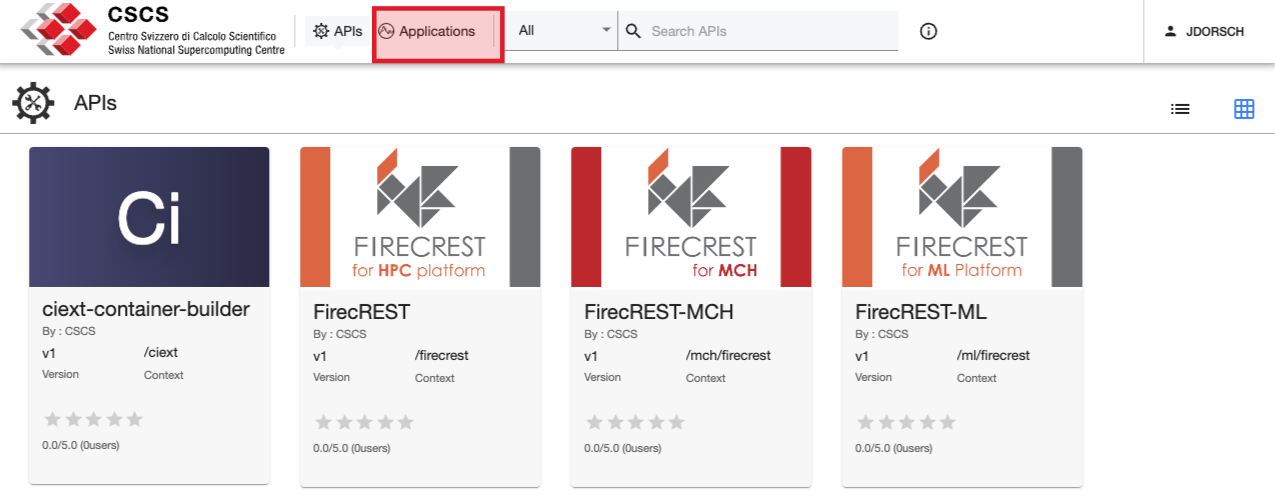
On the Developer Portal click on the tab “Applications”
-
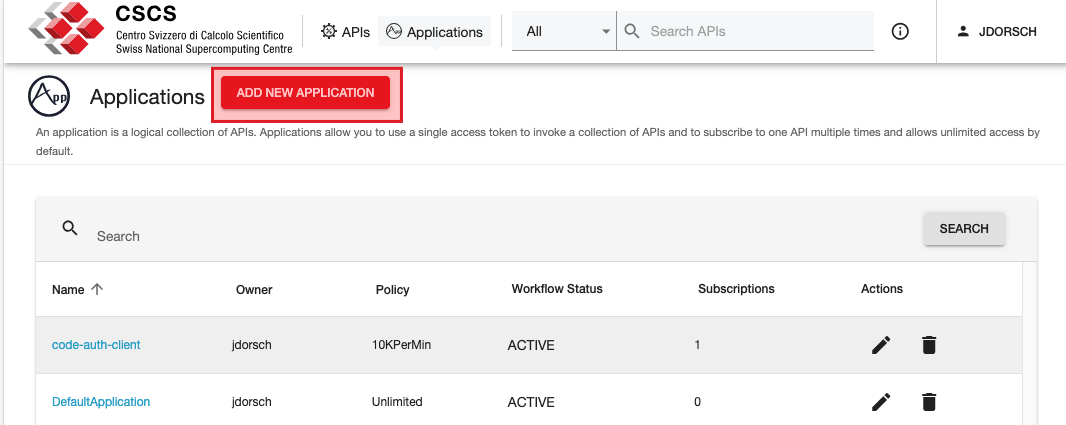
Click on “ADD NEW APPLICATION” to create a new application (or reuse an existing one).
-
Subscribe the application to the Alps Accounting API and choose the desired version.
(4.a) click on the
Subscriptionsoption on the left panel(4.b) click the
SUBSCRIBEbutton(4.c) choose the business plan and the version of the API you want to subscribe to by clicking the
SUBSCRIBEbutton on the right-side of the requested API.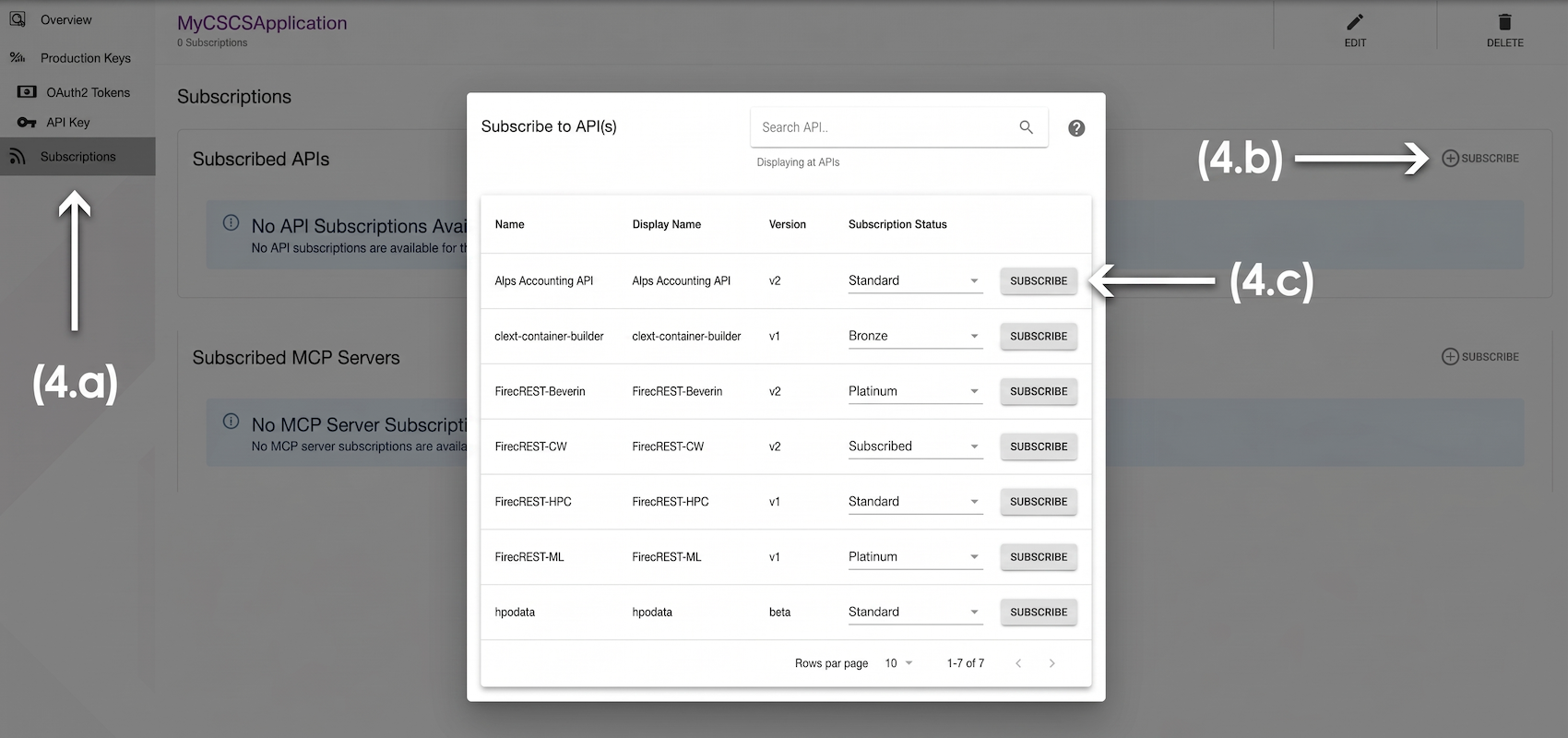
-
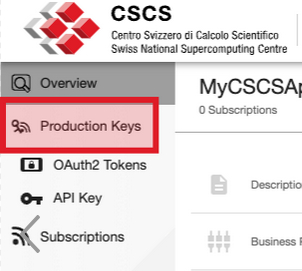
Generate the production keys for the application.
-
Click on the
Generate Keysbutton at the bottom of the page to generate the production keys of your application: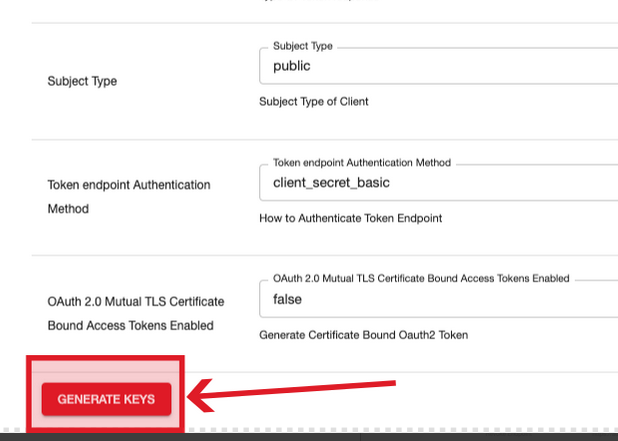
Authentication
Once the keys are generated, you will see the pair Consumer Key (also known as “client id”) and Consumer Secret (also known as “client secret”).
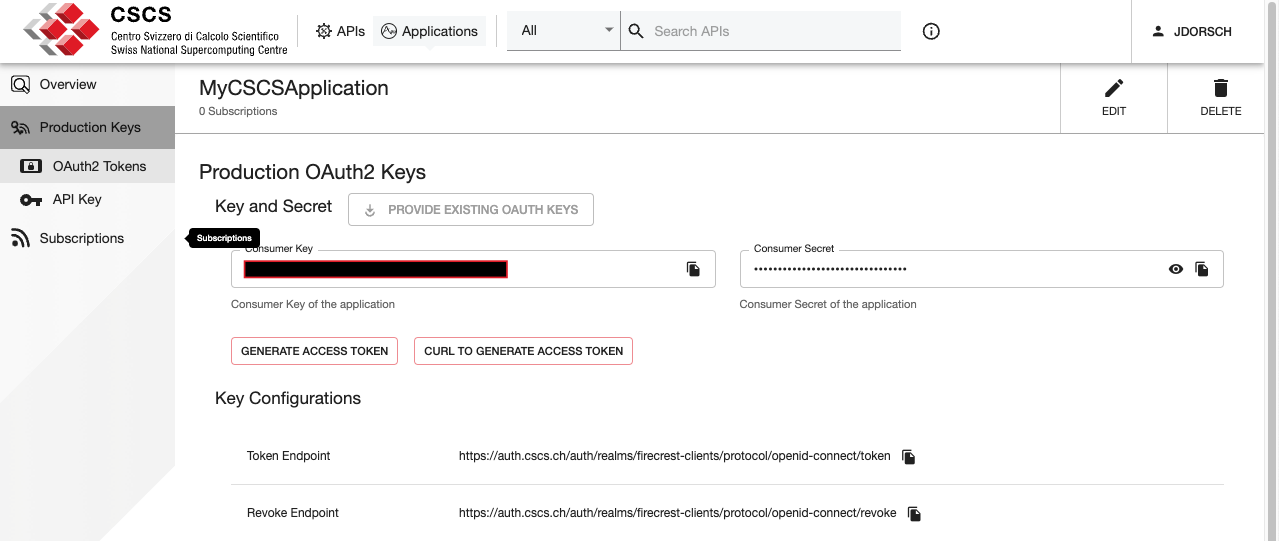
Note
At the moment, only FIRECREST keys are available for the users
Exchange the credentials of your application for a short-lived access token, then include the token in the Authorization header of every request.
Request a token from the firecrest-clients realm of the CSCS identity provider, passing the Consumer Key as the user name and the Consumer Secret as the password with the -u option of curl:
$ curl -s -X POST "https://auth.cscs.ch/auth/realms/firecrest-clients/protocol/openid-connect/token" \
    -u "<CONSUMER_KEY>:<CONSUMER_SECRET>" \
    --data "grant_type=client_credentials" | jq
{
  "access_token": "eyJhbGciOiJSUzI1NiIsInR5cCIgOiAiSldUIiwia2lkIiA6...",
  "expires_in": 300,
  "refresh_expires_in": 0,
  "token_type": "Bearer",
  "not-before-policy": 0,
  "scope": "firecrest firecrest-v2 profile email"
}
The access_token field of the response is the token.
It is valid for 5 minutes (expires_in is in seconds), after which a new token has to be requested.
Store the token in the ACCESS_TOKEN environment variable, which is used by the examples on this page:
export ACCESS_TOKEN=$(curl -s -X POST "https://auth.cscs.ch/auth/realms/firecrest-clients/protocol/openid-connect/token" \
    -u "<CONSUMER_KEY>:<CONSUMER_SECRET>" \
    --data "grant_type=client_credentials" | jq -r .access_token)
Use the token in subsequent requests:
curl -s -X GET "https://api.cscs.ch/alps-accounting/v2/compute/usage/day?from=2025-01-01&to=2025-01-07" \
  -H "Authorization: Bearer $ACCESS_TOKEN"
Warning
Store the Consumer Key, Consumer Secret and access tokens in a secure location such as a password manager or CI/CD secret store. Never commit them to repositories or expose them in logs.
Request limits
The number of requests that an application can make is limited by the requests per minute chosen when creating the application and by the business plan of the subscription. The quota is shared by all of the APIs that the application is subscribed to.
When the quota is exceeded, the API responds with the HTTP status 429 and the following message:
{
  "code": "900807",
  "message": "Message throttled out",
  "description": "You have exceeded your quota .You can access API after 2026-Nov-25 15:23:23+0000 UTC",
  "nextAccessTime": "2026-Nov-25 15:23:23+0000 UTC"
}
Wait until the time given in the nextAccessTime field, which is also returned in the Retry-After header of the response, before sending the next request.
API endpoints
The base URL for all endpoints is https://api.cscs.ch/alps-accounting/v2.
Compute usage
Daily compute usage
GET /compute/usage/day
Returns compute usage records aggregated per day for the requested date range.
| Parameter | Required | Description |
|---|---|---|
from |
yes | Start date in YYYY-MM-DD format. |
to |
yes | End date in YYYY-MM-DD format. |
account |
no | One or more project identifiers to filter by. |
username |
no | One or more usernames to filter by. |
cluster |
no | One or more cluster names to filter by. |
Monthly compute usage
GET /compute/usage/month
Returns compute usage records aggregated per month for the requested month range.
| Parameter | Required | Description |
|---|---|---|
from |
yes | Start month in YYYY-MM format. |
to |
yes | End month in YYYY-MM format. |
account |
no | One or more project identifiers to filter by. |
username |
no | One or more usernames to filter by. |
cluster |
no | One or more cluster names to filter by. |
Storage usage
Daily storage usage
GET /storage/usage/day
Returns storage usage for the specified date.
| Parameter | Required | Description |
|---|---|---|
date |
yes | Date in YYYY-MM-DD format. |
account |
no | One or more project identifiers to filter by. |
customerName |
no | One or more customer names to filter by. |
filesystemName |
no | File system to filter by, e.g. capstor or iopsstor. |
dataType |
no | Storage category: store, archive, user or scratch. |
path |
no | One or more paths to filter by. |
Monthly storage usage
GET /storage/usage/month
Returns storage usage for the specified month.
| Parameter | Required | Description |
|---|---|---|
month |
yes | Month in YYYY-MM format. |
account |
no | One or more project identifiers to filter by. |
customerName |
no | One or more customer names to filter by. |
filesystemName |
no | File system to filter by, e.g. capstor or iopsstor. |
dataType |
no | Storage category: store, archive, user or scratch. Defaults to store. |
path |
no | One or more paths to filter by. |
Examples
The examples below assume that the ACCESS_TOKEN environment variable contains a valid Bearer token.
Query daily compute usage
$ curl -s -X GET "https://api.cscs.ch/alps-accounting/v2/compute/usage/day?from=2025-01-01&to=2025-01-07&account=g123" \
    -H "Authorization: Bearer $ACCESS_TOKEN" | jq
{
  "compute": [
    {
      "id": 1,
      "username": "bobsmith",
      "updated": "2025-01-02T00:00:00Z",
      "userId": 12345,
      "account": "g123",
      "cluster": "clariden",
      "usageDate": "2025-01-01",
      "nodeHours": 12.0,
      "cpuHours": 48.0,
      "jobCount": 3,
      "totalElapsedTime": 43200,
      "totalNodeCount": 4
    }
  ]
}
import requests

url = "https://api.cscs.ch/alps-accounting/v2/compute/usage/day"
headers = {"Authorization": f"Bearer {ACCESS_TOKEN}"}
params = {
    "from": "2025-01-01",
    "to": "2025-01-07",
    "account": "g123",
}

response = requests.get(url, headers=headers, params=params)
print(response.json())
Query monthly compute usage
$ curl -s -X GET "https://api.cscs.ch/alps-accounting/v2/compute/usage/month?from=2025-01&to=2025-03&account=g123" \
    -H "Authorization: Bearer $ACCESS_TOKEN" | jq
{
  "compute": [
    {
      "id": 1,
      "updated": "2025-02-01T00:00:00Z",
      "username": "bobsmith",
      "userId": 12345,
      "account": "g123",
      "cluster": "clariden",
      "usageDate": "2025-01-01",
      "nodeHours": 120.0,
      "cpuHours": 480.0,
      "jobCount": 30,
      "totalElapsedTime": 432000,
      "totalNodeCount": 40
    }
  ]
}
import requests

url = "https://api.cscs.ch/alps-accounting/v2/compute/usage/month"
headers = {"Authorization": f"Bearer {ACCESS_TOKEN}"}
params = {
    "from": "2025-01",
    "to": "2025-03",
    "account": "g123",
}

response = requests.get(url, headers=headers, params=params)
print(response.json())
Query daily storage usage
$ curl -s -X GET "https://api.cscs.ch/alps-accounting/v2/storage/usage/day?date=2025-01-01&account=g123&filesystemName=capstor&dataType=store" \
    -H "Authorization: Bearer $ACCESS_TOKEN" | jq
{
  "storage": [
    {
      "id": 1,
      "updated": "2025-01-02T00:00:00Z",
      "spaceUsed": 1099511627776,
      "spaceCurrency": "B",
      "spaceHardQuota": 2199023255552,
      "spaceSoftQuota": 1975684956160,
      "inodesSoftQuota": 1000000,
      "inodesHardQuota": 1200000,
      "inodesUsed": 500000,
      "usageDate": "2025-01-01",
      "username": "bobsmith",
      "tenant": "cscs",
      "customerName": "acme",
      "account": "g123",
      "dataType": "store",
      "filesystemName": "capstor",
      "systemName": "capstor",
      "path": "/capstor/store/cscs/g123",
      "gid": 32819,
      "uid": 12345,
      "aggregationPeriod": "daily"
    }
  ]
}
import requests

url = "https://api.cscs.ch/alps-accounting/v2/storage/usage/day"
headers = {"Authorization": f"Bearer {ACCESS_TOKEN}"}
params = {
    "date": "2025-01-01",
    "account": "g123",
    "filesystemName": "capstor",
    "dataType": "store",
}

response = requests.get(url, headers=headers, params=params)
print(response.json())
Query monthly storage usage
$ curl -s -X GET "https://api.cscs.ch/alps-accounting/v2/storage/usage/month?month=2025-01&account=g123&filesystemName=iopsstor&dataType=scratch" \
    -H "Authorization: Bearer $ACCESS_TOKEN" | jq
{
  "storage": [
    {
      "id": 1,
      "updated": "2025-02-01T00:00:00Z",
      "spaceUsed": 549755813888,
      "spaceCurrency": "B",
      "spaceHardQuota": 1099511627776,
      "spaceSoftQuota": 989560464998,
      "inodesSoftQuota": 500000,
      "inodesHardQuota": 600000,
      "inodesUsed": 250000,
      "usageDate": "2025-01-01",
      "username": "bobsmith",
      "tenant": "cscs",
      "customerName": "acme",
      "account": "g123",
      "dataType": "scratch",
      "filesystemName": "iopsstor",
      "systemName": "iopsstor",
      "path": "/iopsstor/scratch/cscs/g123",
      "gid": 32819,
      "uid": 12345,
      "aggregationPeriod": "monthly"
    }
  ]
}
import requests

url = "https://api.cscs.ch/alps-accounting/v2/storage/usage/month"
headers = {"Authorization": f"Bearer {ACCESS_TOKEN}"}
params = {
    "month": "2025-01",
    "account": "g123",
    "filesystemName": "iopsstor",
    "dataType": "scratch",
}

response = requests.get(url, headers=headers, params=params)
print(response.json())
Response fields
Compute usage response
Both daily and monthly endpoints return a compute array.
Each element contains:
| Field | Type | Description |
|---|---|---|
id |
int | Record identifier. |
username |
string | User who consumed the resources. |
userId |
int | Internal user identifier. |
account |
string | Project identifier. |
cluster |
string | Cluster where the jobs ran. |
usageDate |
string | Date or month of the aggregation (YYYY-MM-DD for daily, YYYY-MM-01 for monthly). |
nodeHours |
number | Total node-hours consumed. |
cpuHours |
number | Total CPU-hours consumed. |
jobCount |
int | Number of jobs. |
totalElapsedTime |
int | Cumulative elapsed time in seconds. |
totalNodeCount |
int | Cumulative number of nodes used. |
updated |
string | ISO 8601 timestamp of the last update. |
Storage usage response
Both daily and monthly endpoints return a storage array.
Each element contains:
| Field | Type | Description |
|---|---|---|
id |
int | Record identifier. |
username |
string | User or project owner the record refers to. |
account |
string | Project identifier, when applicable. |
customerName |
string | Customer name. |
tenant |
string | Tenant identifier. |
filesystemName |
string | File system name, e.g. capstor or iopsstor. |
systemName |
string | System name. |
dataType |
string | Storage category: store, archive, user or scratch. |
path |
string | File system path. |
usageDate |
string | Date or month of the aggregation. |
spaceUsed |
int | Used space in bytes. |
spaceCurrency |
string | Unit of the space values, typically B for bytes. |
spaceHardQuota |
int | Hard quota in bytes. |
spaceSoftQuota |
int | Soft quota in bytes. |
inodesUsed |
int | Number of inodes used. |
inodesSoftQuota |
int | Soft inode quota. |
inodesHardQuota |
int | Hard inode quota. |
uid |
int | User identifier. |
gid |
int | Group identifier. |
aggregationPeriod |
string | Aggregation period, e.g. daily or monthly. |
updated |
string | ISO 8601 timestamp of the last update. |